Topic: Starships (WIP)

Some of you have seen my starship dogfight clips and renderings of other ship models.  Well, I'm continuing my work until I get a full fleet.

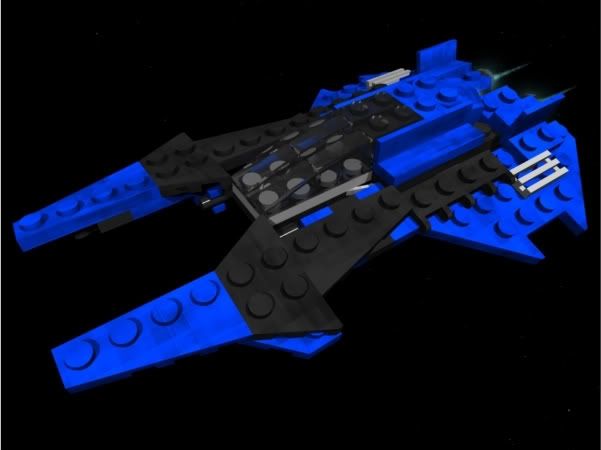
Just finished this yesterday, a Missile Destroyer:
http://i64.photobucket.com/albums/h195/Lechnology/Renders/COW-TDest1.jpg
http://i64.photobucket.com/albums/h195/Lechnology/Renders/COW-TDest2.jpg
http://i64.photobucket.com/albums/h195/Lechnology/Renders/COW-TDest3.jpg
http://i64.photobucket.com/albums/h195/Lechnology/Renders/COW-TDest4.jpg

Next up, giving the models a hull texture.

https://i.imgur.com/4b9NnS3.pnghttps://i.imgur.com/GUIl0qk.pnghttps://i.imgur.com/ox64uld.pnghttps://i.imgur.com/v3iyhE5.png

Re: Starships (WIP)

cool, what program do you use?

Re: Starships (WIP)

LDRAW, Blender, Carrara.

https://i.imgur.com/4b9NnS3.pnghttps://i.imgur.com/GUIl0qk.pnghttps://i.imgur.com/ox64uld.pnghttps://i.imgur.com/v3iyhE5.png

Re: Starships (WIP)

I'll sell my left kidney to get that in real life... mini/yes

I'm BACK! mini/bigsmile

Re: Starships (WIP)

the frozen brick wrote:

I'll sell my left kidney to get that in real life... mini/yes

How about your soul to see it in action? mini/wink

Fighter with hull texture.
http://i64.photobucket.com/albums/h195/Lechnology/Renders/COW-PStrike3.jpg
http://i64.photobucket.com/albums/h195/Lechnology/Renders/COW-PStrike1.jpg
http://i64.photobucket.com/albums/h195/Lechnology/Renders/COW-PStrike2.jpg

Particles not blending as smoothly as I would hope so I may just have it.  Not sure if having hull textures on small ships on fighters are necessary.

Thoughts?

https://i.imgur.com/4b9NnS3.pnghttps://i.imgur.com/GUIl0qk.pnghttps://i.imgur.com/ox64uld.pnghttps://i.imgur.com/v3iyhE5.png

Re: Starships (WIP)

do you build those models on the computer brick by brick?

http://tinyurl.com/67k2bg3
http://tinyurl.com/63xal8hhttp://tinyurl.com/6da2bpuhttp://tinyurl.com/66q72xzhttp://tinyurl.com/6efhkyohttp://tinyurl.com/6jzmuoa

Re: Starships (WIP)

mini/eek  Those are awesome!

Re: Starships (WIP)

Ratboy Productions wrote:

do you build those models on the computer brick by brick?

Yes
http://www.ldraw.org/gallery/JJAnniversary/JJAnniversary_ldraw.png.com

Last edited by Lechnology (January 10, 2010 (06:18pm))

https://i.imgur.com/4b9NnS3.pnghttps://i.imgur.com/GUIl0qk.pnghttps://i.imgur.com/ox64uld.pnghttps://i.imgur.com/v3iyhE5.png

Re: Starships (WIP)

How do you add engine glow?  Is it a blender thing?

http://www.brickshelf.com/gallery/BuilderBrothers/signatures/thac14sig.png

Re: Starships (WIP)

I'm sure you can do it in Blender but I did it in Carrara, using glowing shaders on the polygons of the object and for the particle system and enabling light sphere on a bulb.

https://i.imgur.com/4b9NnS3.pnghttps://i.imgur.com/GUIl0qk.pnghttps://i.imgur.com/ox64uld.pnghttps://i.imgur.com/v3iyhE5.png

Re: Starships (WIP)

Yes, in Blender it's the halo effect under the shading and texturing panel.

http://www.majhost.com/gallery/BGanimations/Signatures/final_400x100.png

Re: Starships (WIP)

Oh my god...its Lech

http://www.brickshelf.com/gallery/fib12345/Lolz/lulz.png
"actuallly this involves spiderman too, not batman. but im also taking a new approach, more comedy, less action. i dont see to many movies like that with more comedy than action" --SteveStarfyTV on an Indiana Jones meets Star Wars idea.

Re: Starships (WIP)

Personally, I think the fighter would look better without those extra textures. But holy crap, they look awesome. Especially the first one.

With all due respect Noodle, I don't want you here. - Ratboy Productions

Re: Starships (WIP)

fib12345 wrote:

Oh my Lech...its Lech

Fixed it, sorry for the error.

http://www.brickshelf.com/gallery/fib12345/Lolz/lulz.png
"actuallly this involves spiderman too, not batman. but im also taking a new approach, more comedy, less action. i dont see to many movies like that with more comedy than action" --SteveStarfyTV on an Indiana Jones meets Star Wars idea.

Re: Starships (WIP)

Demo Reel of renderings I did for Sprinkle.  Essentially, what I've learned from that project I'm applying to my current project.

https://i.imgur.com/4b9NnS3.pnghttps://i.imgur.com/GUIl0qk.pnghttps://i.imgur.com/ox64uld.pnghttps://i.imgur.com/v3iyhE5.png

Re: Starships (WIP)

Nice, but there are a bunch of shots that I don't think are light enough. While I haven't done much lighting myself, I'd suggest doing some global illumination, then set up the rest of the your lights the normal way. I wouldn't make it too bright, but light enough so you can see the whole model. After that, add something in the background, I'm not sure if there are stars in your shots or not, and if there are, they aren't bright enough to see. Add some galaxies, at least.

"[It] was the theme song for the movie 2010 first contact." ~ A YouTuber on Also Sprach Zarathustra
CGI LEGO! Updated occasionally...

Re: Starships (WIP)

Littlebrick wrote:

I'm not sure if there are stars in your shots or not, and if there are, they aren't bright enough to see.

Are you watching in HD fullscreen with a monitor on full brighten?  Because I see them.

Anyways, another rendering for the missile destroyer.

Galaxies don't do much

https://i.imgur.com/4b9NnS3.pnghttps://i.imgur.com/GUIl0qk.pnghttps://i.imgur.com/ox64uld.pnghttps://i.imgur.com/v3iyhE5.png

Re: Starships (WIP)

BGanimations wrote:

Yes, in Blender it's the halo effect under the shading and texturing panel.

could please go into this in more detail?, i have been trying to add drive trails in blender for a while and getting nowhere or could you point me to a handy tutorial?

any help would be appreciated

Re: Starships (WIP)

Make a regular UVsphere and adjust it to where it first comes out of the engine. The go over to the right of the layers buttons and there should be a gray circle in a watsitcalled thingy. click on it and go one up to where the gray circle is orange and says ON. Then in editmode select the point of the sphere that is farthest away from the start of the engine. Grab this, and you should notice that other verticies will also move with it just not as much. This is proportional editing, and that is what the orange circle means. grab it over so that it trails out more, like the engine flame would, and then go back into object mode. Under the shading panel, add new if it's not there already for shading, and in one of the first colums there should be a button that says HALO. Click that, and then you can specify the options of the halo by learning it here.

http://www.majhost.com/gallery/BGanimations/Signatures/final_400x100.png

Re: Starships (WIP)

How do you add backrounds to the shots?  Do you make the backround on another program and then green-screen the ships in?  Or is their a way to import backrounds into Carrara? mini/confused

http://www.brickshelf.com/gallery/BuilderBrothers/signatures/thac14sig.png