Note: These days, community activity has largely moved to the BiM Discord. Join us!
 Bricks in Motion
We are a friendly filmmaking community devoted to the art of stop-motion animation using LEGO® and similar construction toys. Here, you can share your work, join our community of other brickfilmers, and participate in periodic animation contests!
A place to discuss, share, and create stop motion films.
Ad
You are not logged in. Please login or register.


Pinnacle studios 15 is what I'm using.

I've never heard of it.

@Masterlego, Logitech C910.
@Squid, I got half a page/100 words done last night, but it's not my highest quality work.
I'm sure I can make it as long as I don't get distracted by something.
@Walter, Great, I'll be keeping an eye out for it!
@Mickey, Really, nothing? What software do you have? If you can't now, the free/'lite' version of this looks like something you could use. It also looks insanely good. Of course, there may be a catch, as I didn't look that closely.
Last edited by Pritchard Studios (August 13, 2013 (07:26am))

Nice frame, though the guy is slightly out of focus.
If you can't now, the free/'lite' version of this looks like something you could use. It also looks insanely good. Of course, there may be a catch, as I didn't look that closely.
Wow! That does look insanely good, going to have to try that out.

Yeah the focus is just a wee bit off, but I really like the composition of the shot.
Also those pipes/wires in the background look neat.
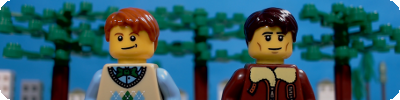

thanks i know about the focus but thats the best i could get it because the "sweet zone" was in between a notch
@repeling spider i know thats from another film i id a while back and i couldn't get all the blood off and he isn't a cop he is a captain in the navy (thats why i got rid of the badge) it makes more sense if you where to watch the scene

I don't have much else to add. One question though; what aspect ratio is that. I looks odd, like it's between 16:9 and 2.35:1.  Also, what's with his hand...it looks melted, unless that's from an object in the foreground.
I don't have much else to add. One question though; what aspect ratio is that. I looks odd, like it's between 16:9 and 2.35:1.
i have no idea what aspect ratio it is i just eyeballed it in the final version i will measure it and stuff  and yesit is but he is moving his hand so its not noticeable.
Okay. And I checked the ratio really quick, and it's about 2.17:1

Hope that planet or moon has oxygen  . Nice frame, like the look of that rock.
I like to do slopes with rocks most of the time, but considering this is on a moon/different planet I think it looks incredible! Adds a much more "cratered" feel to the landscape.
Great job, Backyardlegos. 
That's a really nice frame The one main thing I don't really like is that the back half of the guy is slightly out of focus, like the dof was too narrow.

I really like the lighting in this shot. It's from my first ever brickfilm, which I'm currently working on. (Ignore the grey areas at the top)

Brickfilm frame by --Jayem--, on Flickr

Pritchard Studios wrote:If you can't now, the free/'lite' version of this looks like something you could use. It also looks insanely good. Of course, there may be a catch, as I didn't look that closely.
Wow! That does look insanely good, going to have to try that out.
Though Resolve is great, and the free version has everything you need (unless you're planning on grading and exporting 4K footage ), it's probably not practical for something like this for several reasons...first off, tech specs: it's a big app, needs a computer with 64-bit support and a motherload of RAM. Trust me, even my Mac Pro didn't like it
Another thing is the complexity, Resolve is professional, high-end color-grading software which means its complicated (especially if you know nothing about grading in post...). That sort of brings me to another point, which is the difference here between grading and correcting. What y'all are talking about is color correction, not color grading. You don't need Resolve for decent color correction, but if you're looking to make cool looks (grading) then you may want to start dabbling in more advanced programs, which by no means are limited to resolve.
Anyhow, the thing is that you're working with still images. Stills! There are WAY more options for color correcting stills than video, and that's what you should be taking advantage of. I personally grade and color correct all my stills in lightroom before pulling them into premiere, which is great. Do that! (If you want more info on all this, PM me or something. Or just post here, and I'll try to respond within a week?)
Posts [ 2,781 to 2,800 of 3,680 ]