Re: The CGI Thread

Rusty wrote:

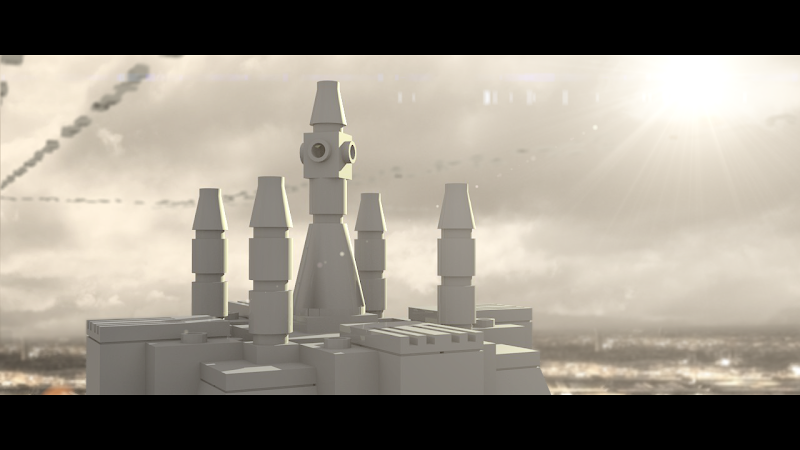
Did you give any of the bricks an edge split modifier? The cone at the base looks like it needs one.

I gave all of them the modifier. mini/smile Here's an updated version...
https://lh3.googleusercontent.com/-RUVtJ8KMmYM/T2-f_0ConPI/AAAAAAAAAVo/0LlIV_y6XaQ/s800/legotemple%2520%252800032%2529.png

https://i.imgur.com/0N0Fc4I.jpg

Re: The CGI Thread

Something still looks wrong with the cone at the base....

"Doc seriously, do that one more time without warning me first and I'll flip this examination table and roundhouse kick you in the face." - Adam young

Re: The CGI Thread

Rusty wrote:

Something still looks wrong with the cone at the base....

It's just some weird shaddow or something. I don't know...

https://i.imgur.com/0N0Fc4I.jpg

Re: The CGI Thread

Nice improvement with the city in the background! I must say though, I think being too precise about this one frame is kind of overkill. It's obviously going to be a shot to orient the audience in space and I'm guessing it will only be on the screen for maybe 4 or 5 seconds at the max? I personally don't think the odd shadowing on the cone is going to be that big of a deal. If it were a still image or something it would be important, but with something like this I don't think it's going to matter a whole lot. If it's going to be a pain to fix, is it really worth it? Just my 2 cents. mini/smile Hope that helps out in some way.

Re: The CGI Thread

ZachFB Studios wrote:
Rusty wrote:

Something still looks wrong with the cone at the base....

It's just some weird shaddow or something. I don't know...

It's the normals.  You have to flip the normals that are pointing inward.

https://i.imgur.com/4b9NnS3.pnghttps://i.imgur.com/GUIl0qk.pnghttps://i.imgur.com/ox64uld.pnghttps://i.imgur.com/v3iyhE5.png

Re: The CGI Thread

Well, I just got Maya.
Does anyone have a good source of beginner tutorials?

EDIT:
Zach, if you're using Blender, just go into Editmode, select the base cone and press CTRL+N. That will flip the normals and remove that wierd shading.

Last edited by ZP (April 7, 2012 (04:23pm))

http://i.imgur.com/lZUQ9.pnghttp://i.imgur.com/9CQIM.pnghttp://i.imgur.com/YZLtR.pnghttp://i.imgur.com/ICcjc.png

Re: The CGI Thread

Just wing it its not difficult mini/bigsmile

Re: The CGI Thread

I have gotten into CGI recently...
but I haven't been using it for brickfilms really.
I like having the ability to create anything I and then animating with it.

I really suck at rigging so far though. mini/lol

by the was Zack FB, that looks cool! wish I could do something like that...

EDIT: I do have a question, does Blender usualy take forever to render a movie. I made a simple ball rolling around as a test, and it is taking Hours to render!:jaw: is their a way to speed things up without damaging the quality or anything?

Last edited by Coyote Creek Films (April 8, 2012 (04:18am))

Re: The CGI Thread

Blender's render engine is apparently one of the slowest.
To remidy this, there are various render plugins, such as Yarfray, INDIGO, and LUXrender.
Some can be downloaded for free, but others cost a good chunk of cash.

http://i.imgur.com/lZUQ9.pnghttp://i.imgur.com/9CQIM.pnghttp://i.imgur.com/YZLtR.pnghttp://i.imgur.com/ICcjc.png

Re: The CGI Thread

Join the open renderfarm for Blender

https://i.imgur.com/4b9NnS3.pnghttps://i.imgur.com/GUIl0qk.pnghttps://i.imgur.com/ox64uld.pnghttps://i.imgur.com/v3iyhE5.png

Re: The CGI Thread

This is stupid...
First i downloaded LUXrender, then Yarfray, in the case of both It is working perfectly but blender won't let me check the box in the ad on's menu that lets me use them.

I looked at Renderfarm but don't like the sounds of "donating my computer" I'm pretty protective of my equipment. mini/tongue

Re: The CGI Thread

Hi Coyote Creek Films,
The main reason you probably can't enable the render addons is because you are using a wrong version of blender.
My suggestion is to grab a build of blender that is already paired with the render engine you want here: Graphicall.

As for speed, probably the best quality/speed render engine is Yafaray. I'm gonna tell you now that LuxRender is SLOW. Mostly due to the fact that it is unbiased. Yafaray can be tricky to use though also. Really BI is just fine for simple stuff. If it is taking a really long time to render a frame then you probably turned up some settings that you didn't need to. Cycles might be worth a try also. What are you trying to render? I should also note that the lowest render time you are likely to get with any renderer and something more than the default cube is going to be 10-20 sec.

Last edited by AnW (April 12, 2012 (12:52pm))

Re: The CGI Thread

You really don't have to be that formal when posting, AnW.

"Doc seriously, do that one more time without warning me first and I'll flip this examination table and roundhouse kick you in the face." - Adam young

Re: The CGI Thread

Rusty wrote:

You really don't have to be that formal when posting, AnW.

Oh, well... uh... I wasn't actually trying to be formal or anything. mini/bigsmile Guess I just lapse into that sort of talking when I am explaining stuff.

Re: The CGI Thread

AnW wrote:

Hi Coyote Creek Films,
The main reason you probably can't enable the render addons is because you are using a wrong version of blender.
My suggestion is to grab a build of blender that is already paired with the render engine you want here: Graphicall.

As for speed, probably the best quality/speed render engine is Yafaray. I'm gonna tell you now that LuxRender is SLOW. Mostly due to the fact that it is unbiased. Yafaray can be tricky to use though also. Really BI is just fine for simple stuff. If it is taking a really long time to render a frame then you probably turned up some settings that you didn't need to. Cycles might be worth a try also. What are you trying to render? I should also note that the lowest render time you are likely to get with any renderer and something more than the default cube is going to be 10-20 sec.

thanks for the help. All I'm rendering is simple stuff so far. I'm not doing any fancy lighting or anything. I tried some stuff yesterday and it went by fairly quickly, I guess mini/tongue If I may ask, what is Cycles? I think it's built into Blender, what does it do that is different then the normal render engine,

thanks again for your help, it suddenly made sense when you said it! mini/eh

Re: The CGI Thread

Cycles is simply a new render engine they are developing for blender (it isn't built in technically, but it might as well be). It is bundled with blender now. You can switch to it in the render drop down menu at the top of the default window. Its big attraction points are:
1. GPU acceleration. This means it can use a video card (has to be a pretty good one though) to render pictures much faster.
2. Realtime rendering. If you have Cycles set as your renderer, you can change a 3d viewport to "Rendered" (in the mode menu that has "Wire", "Solid", etc). This will change the viewport to being a live updating, full rendered view, very helpful when setting up materials and lighting.
3. More physically correct. This means it is (a lot) easier to get pictures that look more "real" because it actually tries to simulate the way light works. It isn't completely unbiased though, like Luxrender, allowing you to still cut corners and stuff to get a faster render.
4. Nodes. Everything (materials especially, but lights and world also) is now set up using nodes. Hope you like spaghetti 'cause noodles are all you got! mini/bigsmile This is a really big one, as nodes allow you to do almost whatever you want.

Re: The CGI Thread

El bumpo

http://i.imgur.com/yPWwR.png
I made this in Blender, with just the internal render engine.

Critique?

Last edited by ZP (April 18, 2012 (04:34pm))

http://i.imgur.com/lZUQ9.pnghttp://i.imgur.com/9CQIM.pnghttp://i.imgur.com/YZLtR.pnghttp://i.imgur.com/ICcjc.png

Re: The CGI Thread

It looks like that spray-on gold paint you find on China-made toys in party stores. Nice work.

Re: The CGI Thread

Buhh-bam.

I think I'm done with this particular animation, so I'm posting it here. Also, here's the video on the 11 Second Club forums if you care to look. That site has been so helpful with improving my animation skills; give it a look sometime.

"[It] was the theme song for the movie 2010 first contact." ~ A YouTuber on Also Sprach Zarathustra
CGI LEGO! Updated occasionally...

Re: The CGI Thread

I opened Blender 2.60 for the first time in months today.

Feels good to be back.

http://tinyurl.com/krwj4ek
http://tinyurl.com/kvxr6umhttp://tinyurl.com/kxofj4mhttp://tinyurl.com/k5fw3syhttp://tinyurl.com/m4rv8tf